// LEXFRIEND
An AI-optimised workspace that automates the manual dossier work slowing legal teams down.
An AI-optimised workspace that automates the manual dossier work slowing legal teams down.
An AI-optimised workspace that automates the manual dossier work slowing legal teams down.
timeline
timeline
Feb '25 - Feb '26
Feb '25 - Feb '26
Feb '25 - Feb '26
Domain
Domain
Legal-Tech
Legal-Tech
Legal-Tech
Scope
Scope
Research, UI, Design system
Research, UI, Design system
Research, UI, Design system
outcome
outcome
Recovered Billable Hours
Recovered Billable Hours
Recovered Billable Hours

01
Context
Context
Context
LexFriend is an AI-supported workspace that helps legal professionals structure cases, draft documents, and prioritise actions. So they keep control of their work and spend less time on repetitive tasks.
// Goal
// Goal
Help legal professionals regain control over complex dossiers by cutting fragmentation and administrative overhead. Legal accuracy and autonomy stayed untouched.
Help legal professionals regain control over complex dossiers by cutting fragmentation and administrative overhead. Legal accuracy and autonomy stayed untouched.
Help legal professionals regain control over complex dossiers by cutting fragmentation and administrative overhead. Legal accuracy and autonomy stayed untouched.
// Scope
// Scope
Redesigning a fragmented legal SaaS platform. This included multiple product domains, a scalable design system for four developers to build on and integrating AI-supported workflows for lawyers and secretaries.
// responsibilities
// responsibilities
Led the product design process from user needs to delivery. I designed core workflows, established the design system, aligned stakeholders and supported a team of 4 developers during implementation.
// Key pain points
01
Manual dossier work
Manual dossier work
Manual dossier work
Building dossiers by hand and logging time after the fact drained hours and left billable work uncaptured.
Building dossiers by hand and logging time after the fact drained hours and left billable work uncaptured.
02
No shared context
No shared context
No shared context
Secretaries couldn't act without interrupting a lawyer, because the system never gave them enough case context.
Secretaries couldn't act without interrupting a lawyer, because the system never gave them enough case context.
03
No shared foundation
No shared foundation
No shared foundation
A fragmented codebase with inconsistent components meant every new feature generated rework and guesswork.
A fragmented codebase with inconsistent components meant every new feature generated rework and guesswork.
02
Discovery
Discovery
Discovery
I interviewed lawyers and secretaries at two small law firms (10–20 employees). One thing became clear: the problem wasn't in the software. They wanted fewer hours lost to manual labor.
Lawyers were buried in administration; secretaries couldn't act without interrupting a lawyer for context. Every workflow decision after that traced back to cutting down activities that were time consuming,
The bottleneck wasn't people. It was the operational structure around them.
Both roles were compensating for system limitations through manual workarounds.
“I was losing hours to administration that pulled me away from actual legal work.”
Manual dossier building, fragmented workflows, and retrospective time registration created hidden operational drag.
“Even simple tasks required interrupting a lawyer, because the system didn't give me enough context to act independently.”
Fragmented information and permission dependency blocked execution.
FRICTION → DEPENDENCY → STRUCTURAL BOTTLENECK
The bottleneck wasn't people. It was the operational structure around them.
Both roles were compensating for system limitations through manual workarounds.
“I was losing hours to administration that pulled me away from actual legal work.”
Manual dossier building, fragmented workflows, and retrospective time registration created hidden operational drag.
“Even simple tasks required interrupting a lawyer, because the system didn't give me enough context to act independently.”
Fragmented information and permission dependency blocked execution.
FRICTION → DEPENDENCY → STRUCTURAL BOTTLENECK
03
Foundation first
Foundation first
Foundation first
In my first weeks, I found a fragmented codebase: inconsistent components, hardcoded spacing and no shared UI foundation. This wasn't just a design issue, it was generating rework and implementation sprint after sprint. I identified this early and made the decision to start with the foundation before adding new workflows on top.
// Goal
// Goal
Find where the day actually breaks down, then design AI workflows that remove the manual load. Lawyers keep control of the legal work.
Find where the day actually breaks down, then design AI workflows that remove the manual load. Lawyers keep control of the legal work.
Find where the day actually breaks down, then design AI workflows that remove the manual load. Lawyers keep control of the legal work.

FIG_02 - NO FOUNDATION :: Fragmented, manual dossier workflows

FIG_03 - WITH FOUNDATION :: Consistent patterns, and scalable UI.
04
Building the system
Building the system
Building the system
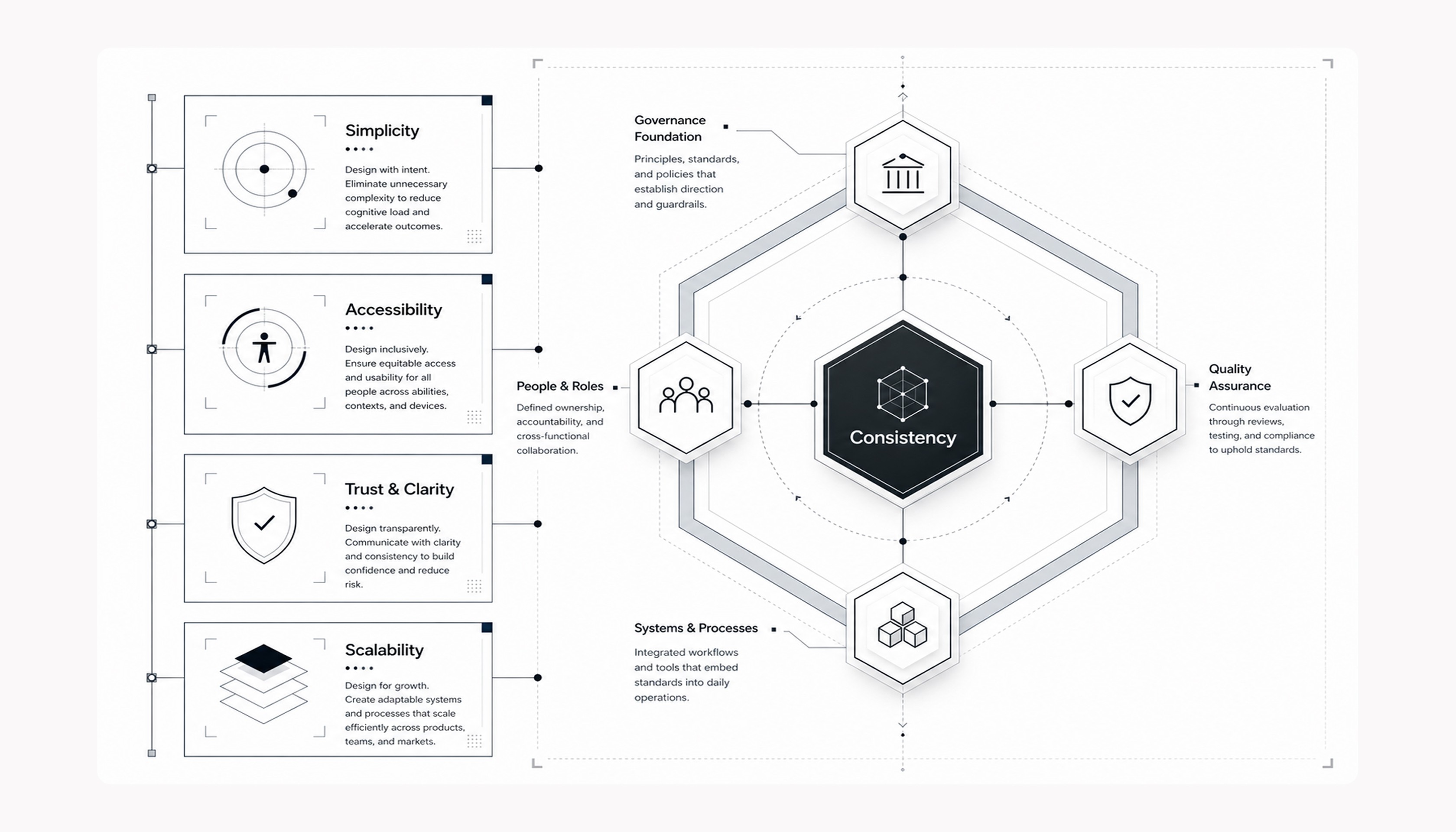
As the only designer working with four developers, I created the design system while delivering product features. When a feature required a new component, I designed it for that feature, added it to the shared library, documented its use, and connected it to the token structure.
This meant the system grew from shipped product needs, nothing speculative. The team used new components immediately. No pausing feature delivery, no separate design system rotting in Figma.
// PRINCIPLES
01
Foundation first
Foundation first
Foundation first
Fix the underlying system before layering new features on top.
Fix the underlying system before layering new features on top.
02
Low learning curve
Low learning curve
Low learning curve
Design AI interactions so users only need to know what to do next, not how the AI works.
Design AI interactions so users only need to know what to do next, not how the AI works.
03
Control stays with the user
Control stays with the user
Control stays with the user
AI does the work; the lawyer stays in control of confirmation and accuracy.
AI does the work; the lawyer stays in control of confirmation and accuracy.
// The Process
01
01
Define the principles
Define the principles
Created a shared design language to reduce inconsistency before components were built.
Created a shared design language to reduce inconsistency before components were built.
02
02
Token structure
Token structure
Built the token foundation from scratch, focused what the product needed to stay maintainable.
Built the token foundation from scratch, focused what the product needed to stay maintainable.

03
03
Embed it in the team
Embed it in the team
Applied the system while designing new features, adding patterns before handoff to keep product & system aligned.
Applied the system while designing new features, adding patterns before handoff to keep product & system aligned.

05
Workflows
Workflows
Workflows
With the system in place, I applied it to the workflows that mattered most: Time registration and Dossier management.
// Flow 1
Time registration
Time registration
Problem
Problem
Problem
Time registration was fragmented, manual, and often done after the fact.
Trade-off
Trade-off
Trade-off
Letting AI interpret notes introduces a small learning gap for the assistant.
Solution
Solution
Solution
AI-driven time registration dropped the manual effort and gave a reliable billing foundation.
// Flow 2
Dossier summary
Dossier summary
Problem
Problem
Lawyers and secretaries worked from different information; secretaries lacked case context.
Trade-off
Trade-off
An AI summary is only as good as the dossier data; incomplete input misleads rather than helps.
Solution
Solution
A dossier-level summary gives both roles the same picture: status, financials and next actions.
06
Outcome
Outcome
Because the product was in active development throughout the project, there were no post-launch metrics. That's why the outcomes below are qualitative, not measured against launch metrics.
01 Time
01 Time
Lawyers stopped losing billable hours to manual registration. Time was logged when it happened, not guessed at the end of the month.
Lawyers stopped losing billable hours to manual registration. Time was logged when it happened, not guessed at the end of the month.
02 Alignment
02 Alignment
The information gap between lawyers and secretaries was closed. They had one single source of truth they both have direct access to.
The information gap between lawyers and secretaries was closed. They had one single source of truth they both have direct access to.
03 Scale
03 Scale
No building inconsistencies. Every new workflow got built from existing components. No alignment rounds, no rework.
No building inconsistencies. Every new workflow got built from existing components. No alignment rounds, no rework.
07
Reflection
Reflection
Reflection
Designing AI features for legal software showed me where automation adds value and where it introduces risk. Lawyers rely on accurate outputs for client work and billable time, so errors have direct consequences.
That required clear confirmation steps, transparent explanations of AI-generated results, and user control before anything was saved or applied.
// key learning
// key learning
Design the feeling of control first, then let the AI do the work.
Design the feeling of control first, then let the AI do the work.
Design the feeling of control first, then let the AI do the work.
// OTHER PROJECTS

